Clap. And you're in.

Onix hears your double clap and instantly launches your music and workspace. Every time.

Download for Mac — Free Trial

Free trial · Mac only · Requires microphone

Easy to install

Three claps to launch

1

Double clap

Onix hears you through your mic — filters out background noise, catches only real claps.

2

Music starts

Spotify or YouTube — your chosen track plays automatically.

3

Apps open

Your apps load in Chrome, ready to go. Same setup, every time.

Built for how you actually work

Smart clap detection

Ambient noise filtering, spike analysis, and quiet-period gating — only real double claps trigger your setup.

Your setup, every time

Configure your music and websites once. Onix remembers and launches them exactly the same way, every session.

Lives in your menu bar

Always ready, never in the way. A tiny icon in your menu bar — that's it. No dock icon, no clutter.

One-time price

$12, once. No subscription, no recurring fees. Pay once, use it forever.

How to open Onix

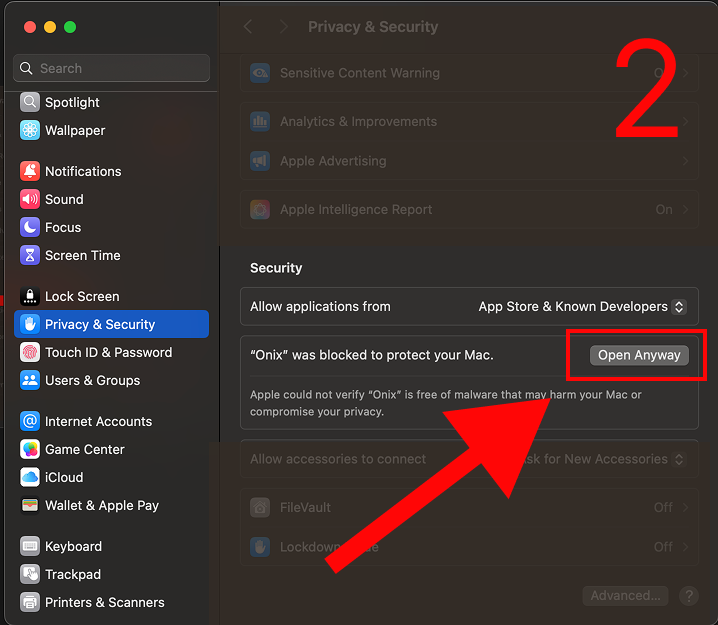
macOS may block the app on first launch. Here's how to open it:
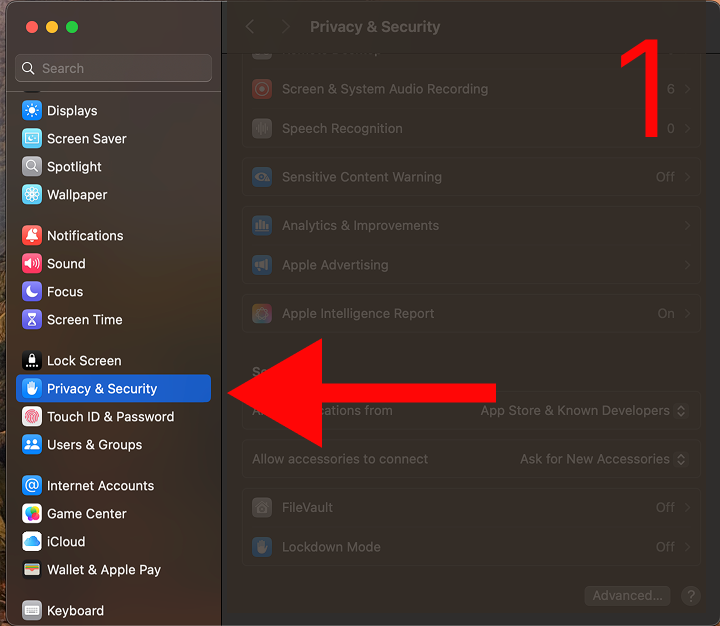
Step 1: Open Privacy and Security settings Step 2: Click Open Anyway

Paste this in Terminal after moving Onix to your Applications folder. This removes the download restriction.

You only need to do this once. Apple Developer certificate coming soon.

Ready to clap?

Download for Mac

macOS 12+ · Apple Silicon · v1.2.15